Delete Account
This guide explains how to Delete your Account in the Loft App.
Watch The Video Tutorial
Steps to Delete Account
-
Open the Loft App
-
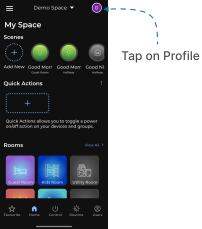
Access Profile Settings
- Tap on the Profile icon located at the top-right corner of the screen.
- The Account screen will open.
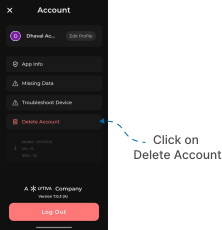
- Open Delete Account Option
- Tap on Delete Account.
- The Delete Account screen will appear with a dropdown menu.
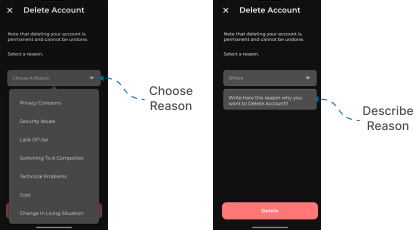
- Select Reason for Deletion
- From the dropdown options, select your reason for deleting the account.
- In the Description input field, briefly describe your reason.
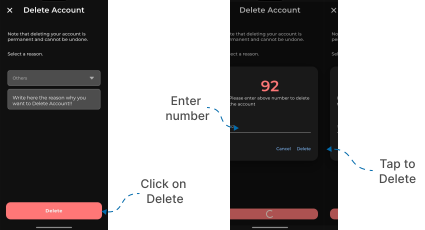
- Confirm Account Deletion
- Tap the Delete Account button below.
- A confirmation popup will appear with a number.
- Enter the same number into the input field to confirm.
- Tap on Delete to proceed.
Your Loft App account will now be deleted successfully.